
一键收藏网页精华,花瓣工具更高效
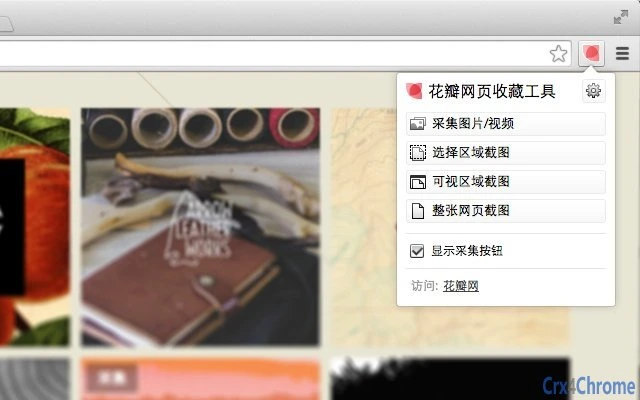
The 花瓣网页收藏工具 is a browser extension designed to simplify the process of saving and organizing online content. It enables users to capture images, videos, and full or partial webpage screenshots with ease, making it ideal for creatives, researchers, and anyone who frequently gathers digital inspiration. The tool supports batch saving of up to 10 images at once and offers flexible screenshot modes—covering entire pages, visible sections, or custom-defined areas.
All saved items are synchronized to a personal account on Huaban.com, allowing access across devices. Users can categorize their collections freely and revisit them anytime. The extension also taps into a vast community-driven library, where users can discover curated content and find new creative ideas.
It is particularly useful for designers, students, and content creators who rely on visual references. The tool integrates directly into the browser, minimizing workflow disruption while maximizing convenience.
Key Features & Capabilities
- Multi-format Content Collection – Capture images, videos, and webpage screenshots with a single click. Supports both individual and batch saves, allowing up to 10 images to be collected at once.
- Advanced Screenshot Options – Offers three screenshot modes: full-page, visible area, and customizable region. This flexibility ensures precise capture of relevant content without unnecessary background.
- Cloud Sync Across Devices – Saved content is automatically synced to the user’s personal account on Huaban.com. This enables seamless access from any device with an internet connection.
- Personalized Organization – Users can create custom collections and assign tags or categories to their saved items, enhancing content discoverability and workflow efficiency.
- Community Discovery – Access to a large library of user-curated pins allows users to browse popular and inspiring content, sparking new ideas and creative direction.
- Source Tracing – Each saved image includes a link back to its original webpage, enabling users to verify sources or explore related content.
These features are especially beneficial for professionals who rely on visual references, such as graphic designers, marketers, and researchers. The ability to save and organize content in one place reduces the need to search through multiple tabs or bookmarks, streamlining the creative process.
User Interface, Workflow & Performance
The interface of the 花瓣网页收藏工具 is designed for simplicity and speed. The extension integrates directly into the browser toolbar, presenting a minimalistic popup with clearly labeled buttons for different capture types. Navigation is intuitive—users can initiate a save with a single click, choose their preferred screenshot mode, and confirm the action without complex steps.
The workflow is optimized for efficiency, minimizing interruptions during browsing. The tool operates in the background, with no visible performance impact reported in the available documentation. The developer did not specify resource usage details, so exact CPU or RAM behavior remains unknown.
However, based on general extension behavior, it is expected to maintain low overhead. Stability appears to be consistent, with regular updates addressing bugs related to screen rendering, caching, and compatibility. The extension has undergone several refinements since its initial release, including layout improvements and fixes for Retina display rendering.
Compatibility & System Requirements
The extension is compatible with major desktop operating systems, including Windows, Mac, and Linux. It functions as a Chrome extension, requiring a modern version of Google Chrome to operate. The installation size is 1.2 MB, indicating a lightweight footprint.
The developer did not provide additional system requirements, so exact hardware specifications such as RAM or processor details are not available. Compatibility with specific Chrome versions was previously noted, with a minimum requirement of Chrome 22. However, current compatibility with newer Chrome versions is not explicitly confirmed.
The extension supports both desktop and mobile access through the Huaban.com platform, allowing users to view and manage their collections across devices.
Pros and Cons
Pros
- Efficient one-click saving of images, videos, and screenshots
- Supports batch collection of up to 10 items at once
- Flexible screenshot modes for precise content capture
- Cloud synchronization enables access from any device
- Free to use with no hidden costs
- Integrated source tracing for content verification
- Active community library for discovery and inspiration
Cons
- Requires a Chrome browser for full functionality
- Exact performance and resource usage details not provided
- Only available as a browser extension, not a standalone desktop app
- Interface limited to Chrome’s extension model, with minimal customization options
- Support for non-Chrome browsers not confirmed
Is the花瓣网页收藏工具 compatible with Mac and Windows?
Yes, the extension is compatible with both Windows and Mac operating systems, as long as they support Google Chrome.
Can I use this tool without an internet connection?
Basic saving functions require an internet connection to sync content to your Huaban account. However, some local data may be stored temporarily, though this is not confirmed in the provided information.
Is the software safe to install?
As a Chrome extension from a known developer (Huaban.com), it is considered secure. However, users should ensure they install it only from official sources to avoid potential risks.
How often are updates released?
Updates have been released periodically since 2014, with the latest version (1.4.9) published in 2018. The frequency of updates has slowed over time, but the extension remains functional with current Chrome versions.
What type of license does this tool use?
The software is free to use and distributed under a free license. No subscription or paid tier is required.
Final Thoughts
The 花瓣网页收藏工具 remains a powerful and practical solution for users who need to save and organize visual content from the web. Its core strengths—easy one-click saving, batch processing, flexible screenshots, and cloud sync—make it a valuable asset for creatives and researchers alike. While it is limited to Chrome and lacks detailed performance metrics, its reliability and long-standing presence in the market speak to its stability.
The integration with a large community-driven content library adds significant value beyond simple saving. For anyone looking to collect, manage, and discover visual inspiration efficiently, this tool delivers consistent results. Its free status and lightweight design further enhance its appeal.
Download 花瓣网页收藏工具 now to streamline your digital content workflow.







